SETUP
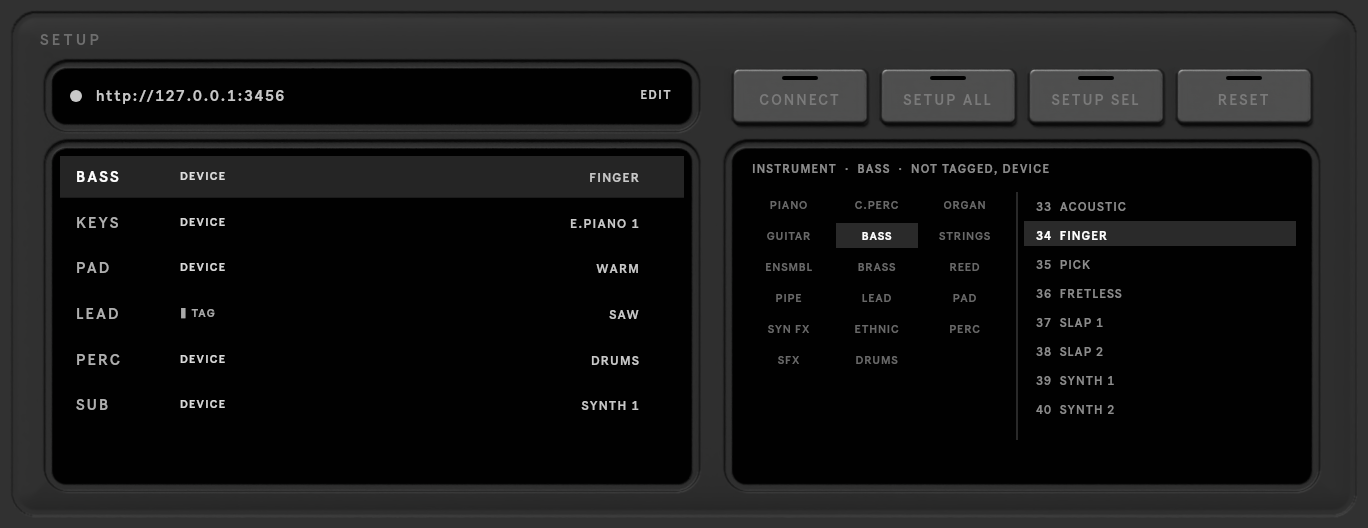
The SETUP key at the top right opens the server address and each track's instrument.
Server
The address of the MIDI-GPT server. The light is green when the server answers. Click EDIT to change it:
http://127.0.0.1:3456 for the server on this computer, or another machine's address (see
Install). The address is remembered for every set.
Track instruments
MIDI-GPT needs to know what each track plays: one of the 128 General MIDI instruments, or drums. The list shows each track, where its instrument came from, and the instrument.
| Key | |
|---|---|
| SETUP ALL | go through every track: guess each instrument, confirm it (or pick another), and tag the track |
| SETUP SEL | the same for the selected track, or for the rows you Shift-clicked |
| CONNECT | check the server again and reload its models |
| RESET | put every setting back to its default (the server address stays); click again when it reads SURE? |
Pick an instrument for the selected track in the browser on the right: a family, then a program.
The instrument is stored on the track itself, in a small MIDI-GPT Instrument device that setup adds. It follows the track when you rename, move or duplicate it, and is saved with the set. You can also change it from that device's FAMILY and PROGRAM menus.
A track without a tag is guessed from its instrument (a Drum Rack means drums), then from its name, else piano.
Note
MIDI-GPT doesn't play anything: your tracks keep their own instruments and sounds.