ENGINE
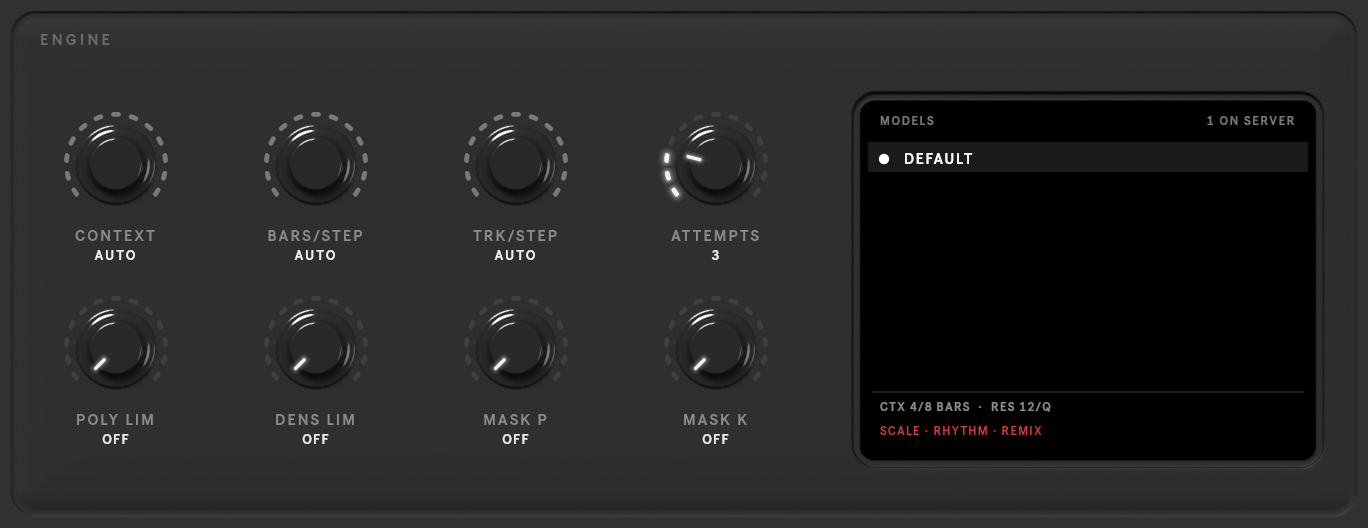
The ENGINE key at the top right opens the model and how it generates. These settings are for the whole device.
| Control | Range (default) | What it does |
|---|---|---|
| Models | the server's list | which model to use, when the server offers several |
| CONTEXT | the model's options (AUTO) | how many bars the model sees at once |
| BARS/STEP | 1 to CONTEXT (AUTO) | how many bars are generated per step |
| TRK/STEP | 1–16 (AUTO) | how many tracks are generated per step |
| ATTEMPTS | 1–10 (3) | how many times a rejected result is retried |
| POLY LIM | 0–32 (off) | a hard limit on notes starting together |
| DENS LIM | 0–64 (off) | a hard limit on notes per bar |
| MASK P | 0–0.95 (off) | skip the model's likeliest note choices, up to this share of its confidence, for less obvious notes |
| MASK K | 0–100 (off) | the same, as a number of choices |
| VELOCITY · MICRO | on / off | generate velocities and microtiming, when the model supports them |
The limits and masks never touch the structure: bars still end where they should, and a generated bar keeps the scene's time signature. POLY LIM and DENS LIM also apply to EXACT rhythm and REMIX, and win over them.
Long scenes are generated in steps: the model writes BARS/STEP bars of TRK/STEP tracks at a time, sliding its CONTEXT window along the scene. The windows follow what you painted: an AR track keeps its own last bars in view as it continues, and painted bars sit in the middle of their window.
On AUTO (the default for all three), the server plans the steps. When a step would not fit the model, it first leaves out the context tracks the model needs least (they show struck through, in amber, in the roll after the run), then makes the steps smaller, and only then uses a smaller CONTEXT. Tracks you never want left out of the context: generate with the setting fixed instead, or mark the ones you don't need IG.